Servers
How to Check Your Server in ROB RUN
Find your State ID, tell it apart from your player ID, and share it with a friend.
Sources checked
Find your current State ID
While you’re in a game, open the world map and look for the server label along the top of the map. Write down the State ID together with the region shown next to it. The State is the particular server your character is on. GamerBlurb’s map walkthrough
- Go into the game with the character you use to play.
- Open the world map and scan its top edge for the region and State ID.
- Send that ID to your friend. Ask them to open their own map and compare the IDs.
If the numbers match, you can go straight to the party invite. If they differ, choose who will move and follow the server change guide.
Find your State ID from Settings
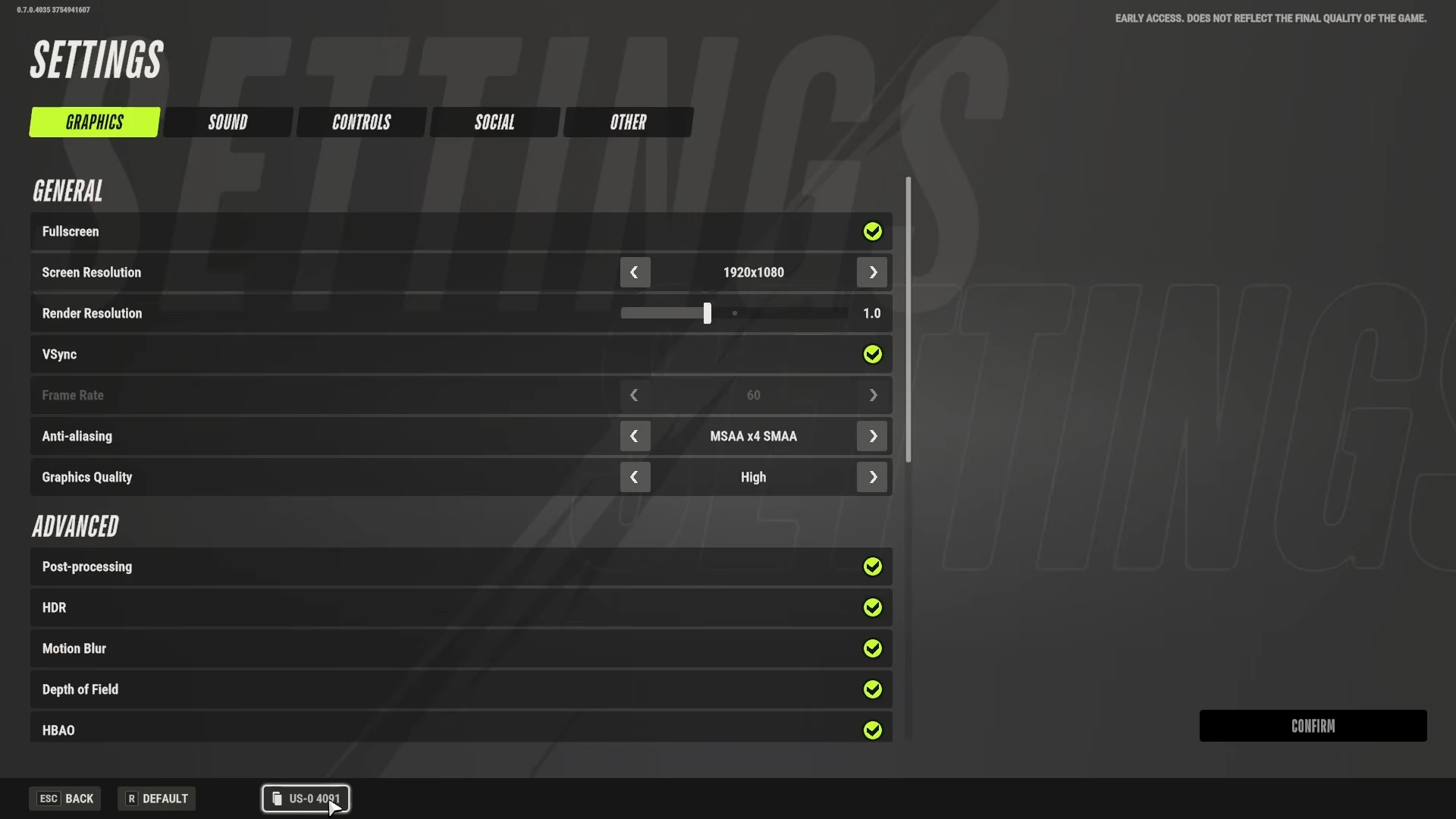
If the world map is unavailable, open the game menu and choose Settings. In the recorded build, the State ID sits at the bottom left beside Back and Default, with a copy icon. Send your own ID to your friend.
If the ID is missing
Check whether Streamer Mode is on in Settings. GamerBlurb reports that it can hide server details. If you disable it, reopen the world map and check the label again. The exact setting location can vary by build. Settings footage · Streamer Mode reference
Which ID do I share?
Share the number attached to the State on the map. A UID identifies your player account and is used for things like support. If a friend sends only a region name, ask for the State ID as well.